
Drag & Drop
What is the Planning option for?
Do you want your screens to display the right content at the right time, without having to step in manually during your working day? The Planning option in Easy Multi Display is made for exactly that.


What is the Planning option?
Planning is a scheduling tool accessible from the calendar icon in the software toolbar. It lets you broadcast your content whenever you want, by defining in advance the days and times of display. You set up your sequence once, and Easy Multi Display takes care of broadcasting everything automatically at the scheduled time.
The benefit is simple: reducing the manual management workload. Once your schedule is in place, your screens display the expected content without you having to attend to it continuously.
The interface elements
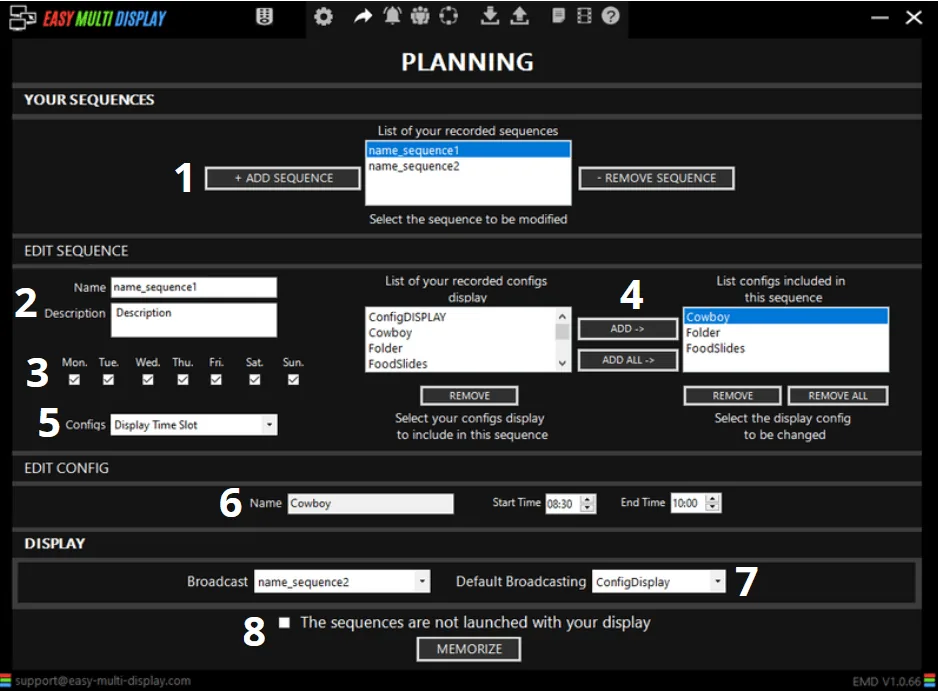
The planning window is organised around three main areas:
- Your sequences: the list of schedules already created and saved. You find them here to reuse or edit them.
- Edit the sequence: the area where you configure a new schedule.
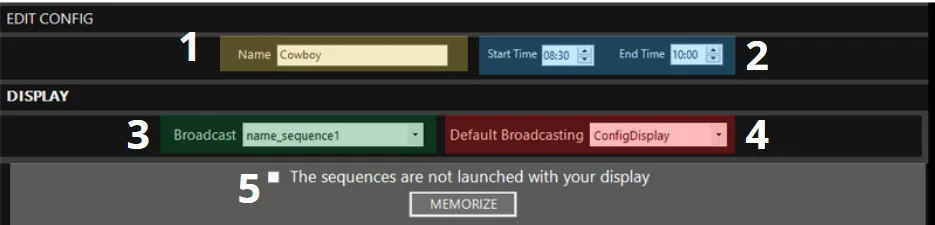
- Edit the configuration: the area where you define the display times.
How to create a schedule step by step
- Add a new sequence to the list of saved sequences.
- Give it a name and a description, so you can find it easily later.
- Select the desired broadcast days.
- Choose the displays (the content) to broadcast.
- Define the time slots, in hours and minutes.
- Assign a time slot to each display.
- Select a fallback display if needed, to cover periods with no scheduled content.
- Save your configuration.
Once the sequence is saved, it appears in the “Your sequences” list and will trigger automatically on the days and times you have defined.
In summary
The Planning option saves you time by automating the broadcast of your content. You prepare your sequences in advance, you organise them by days and time slots, and your screens display the right content at the right time, without any supervision on your part.