
Drag & Drop
The display won't start: how to fix it?
You click on “Start display” and nothing happens? Easy Multi Display won’t launch your video wall? Don’t panic, this problem is usually solved in a few seconds by resetting the configuration.
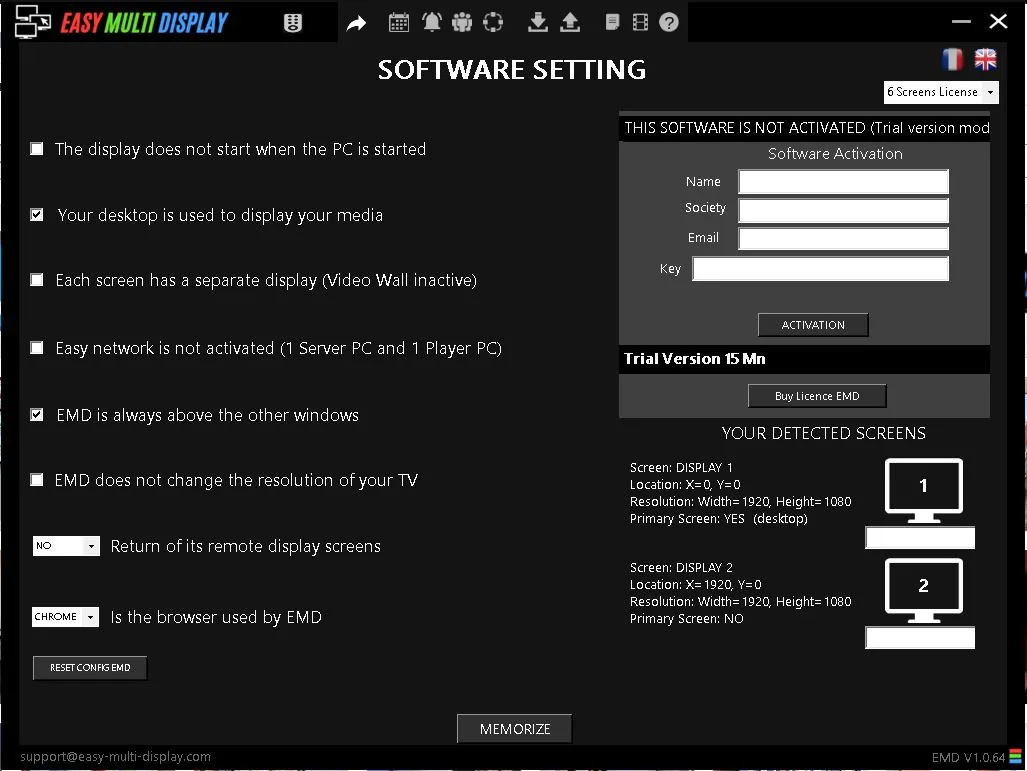
Why the display won’t start
In the vast majority of cases, a display that won’t start is caused by a corrupted configuration file or a setting stuck on an inconsistent value (for example a screen or a resolution that no longer exists). The simplest and most effective solution is to reset the Easy Multi Display configuration.
Reset the configuration in 3 steps
-
In Easy Multi Display, go to the shortcut at the top of the software and click on the cog-shaped icon (the gear). The software settings window appears.
-
At the bottom of this settings window, click on “Reset EMD Config”. Be sure not to forget to click on “Memorize” before leaving this window, so the reset is saved.
-
Try to restart your display: it should now start perfectly.
Still having the problem?
If your display still won’t start after this reset, several resources are available to you:
- Check the FAQ to find the most frequently asked questions.
- Download the user guide for detailed help.
- Contact our customer support at support@easymultidisplay.com, describing your configuration precisely (number of screens, resolution, any error message).
Our team is here to help you get your video wall back up and running as quickly as possible.