
Drag & Drop
How to display several videos one after the other?
Do you want to chain several videos automatically on your video wall, without any action from the operator? Easy Multi Display can play a sequence of videos continuously, then start again from the beginning in a loop. Two methods are available depending on where your files come from.
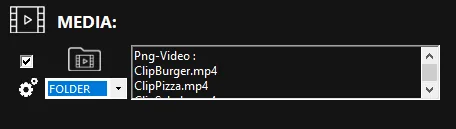
Method 1: play a folder of local videos
This is the simplest solution if your videos are saved on the computer or on a network drive.
- In the media panel, click “Folder”.
- Select the folder that contains your videos.
- Drag and drop this folder into the desired display zone on the wall.
The videos in the folder are then played one after the other, in order. Once the last video is finished, playback automatically resumes from the first one, in a loop. No action is needed during playback.
Method 2: play a sequence of online videos
If your videos are hosted on a streaming platform (YouTube, Vimeo or Dailymotion), you can also chain them automatically.
- Prepare the list of videos to play from the chosen platform.
- Add these videos to the display zone on your wall.
As with the folder method, the videos follow one another automatically, then playback returns to the beginning once the series is finished. Playback continues in a loop without any action.
Automatic loop playback
In both cases, the principle is identical: the videos play in order, and the whole set starts again as soon as the last video is finished. This is ideal for permanent display in a command room, at a reception desk or during a continuous presentation.
Need help?
Check the frequently asked questions (FAQ) and the downloadable user guide. For any questions, contact our support at support@easymultidisplay.com.